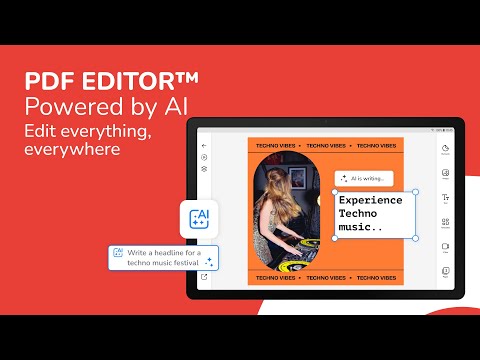

PDF Editor – Edit Everything!
In-app purchases

star
184K reviews

Everyone
info
10M+
Downloads


About this app
Edit a PDF and get back the file you expected.
Many PDF editors move your fonts, your spacing and your layout. PDF Editor is built to keep them where they are. Open a PDF, change the text, the images and the pages, export it, and the document still looks like the original. If a file ever does not come out right, message us from inside the app: we reply within one business day and fix import, editing and font problems as a priority, keeping you posted until it is done.
Built in Australia. Your documents stay yours.
What you can do
• Edit PDF text: change words, font, size and color directly on the page.
• Edit PDF images: replace, crop, resize or delete any image.
• Sign PDF: draw or type your signature once and place it on any document.
• Fill PDF forms: complete a form, save it and send it.
• Merge PDF: combine several PDF files into one.
• Split PDF: separate one PDF into smaller files.
• Compress PDF: reduce the file size for email and upload.
• Convert PDF to JPG or PNG: turn any page into an image.
• Turn images into a PDF: combine photos or scans into one document.
• Open Word, PowerPoint and Illustrator files: edit them as a PDF and export.
• Organize pages: reorder, rotate, duplicate, delete, crop and number pages.
• Annotate PDF: highlight and underline what matters.
• Redact PDF: black out text that must not be shared.
• Scan to text (OCR): turn a scanned page into text you can edit.
• Unlock PDF: remove a password you own.
• Watermark PDF: add a watermark, a header or a footer.
• Resize PDF: change the page format without losing quality.
Read and annotate any PDF
Open any PDF file, read it and highlight what matters. Large files stay sharp when you zoom.
Edit PDF text properly
Tap a paragraph and type. PDF Editor keeps the font, the line breaks and the spacing you already have, so you do not have to rebuild the page after every change.
Sign and fill without printing
Draw or type a signature, place it, save it. Fill in a contract, an invoice or an application form and send it back the same day. No printer needed.
Merge, split and compress
Combine a set of files into one report. Pull three pages out of a long contract. Compress a large PDF so it fits an email limit. All from your phone.
Convert and export
Save as PDF for print or for web. Export a page as JPG or PNG for a message or a slide. Turn a set of photos into one PDF. Open a Word, PowerPoint or Illustrator file and work on it as a PDF.
Start from a template
Do not start from an empty page. Open a ready-made invoice, report, proposal, contract, letter, resume, flyer or business card, then change the parts you need. Every template is editable and exports as a PDF.
Phone, tablet and web
Your documents sync, so you can start on a phone and finish on a laptop.
What is free and what is paid
Every month a free account includes 5 PDF edits and 20 PDF tool operations such as merge, split, compress or rotate. Subscriptions raise these allowances and more: monthly AI credits and extra storage are included. The price is shown before you buy, and you can cancel at any time in Google Play.
Common questions
Can I change text in a file someone else made? Yes. Open it and tap the text.
Can I put two files together? Yes, use Merge.
Can I make a file smaller? Yes, use Compress.
Can I turn a scan into text? Yes, use Scan to text.
Do I need an account? Merge, split, compress, rotate and the other page tools work without one. Editing text, signing, filling forms and watermarks need a free account.
Does it work offline? Merge, split, compress, sign, fill forms and the other page tools run on your device and work offline. Editing PDF text in the full editor, scan to text and the AI tools need an internet connection.
Something did not import or export correctly. What now? Send it to us from Settings → Feedback & Support. We reply within one business day.
Download PDF Editor and fix the PDF properly, the first time.
Many PDF editors move your fonts, your spacing and your layout. PDF Editor is built to keep them where they are. Open a PDF, change the text, the images and the pages, export it, and the document still looks like the original. If a file ever does not come out right, message us from inside the app: we reply within one business day and fix import, editing and font problems as a priority, keeping you posted until it is done.
Built in Australia. Your documents stay yours.
What you can do
• Edit PDF text: change words, font, size and color directly on the page.
• Edit PDF images: replace, crop, resize or delete any image.
• Sign PDF: draw or type your signature once and place it on any document.
• Fill PDF forms: complete a form, save it and send it.
• Merge PDF: combine several PDF files into one.
• Split PDF: separate one PDF into smaller files.
• Compress PDF: reduce the file size for email and upload.
• Convert PDF to JPG or PNG: turn any page into an image.
• Turn images into a PDF: combine photos or scans into one document.
• Open Word, PowerPoint and Illustrator files: edit them as a PDF and export.
• Organize pages: reorder, rotate, duplicate, delete, crop and number pages.
• Annotate PDF: highlight and underline what matters.
• Redact PDF: black out text that must not be shared.
• Scan to text (OCR): turn a scanned page into text you can edit.
• Unlock PDF: remove a password you own.
• Watermark PDF: add a watermark, a header or a footer.
• Resize PDF: change the page format without losing quality.
Read and annotate any PDF
Open any PDF file, read it and highlight what matters. Large files stay sharp when you zoom.
Edit PDF text properly
Tap a paragraph and type. PDF Editor keeps the font, the line breaks and the spacing you already have, so you do not have to rebuild the page after every change.
Sign and fill without printing
Draw or type a signature, place it, save it. Fill in a contract, an invoice or an application form and send it back the same day. No printer needed.
Merge, split and compress
Combine a set of files into one report. Pull three pages out of a long contract. Compress a large PDF so it fits an email limit. All from your phone.
Convert and export
Save as PDF for print or for web. Export a page as JPG or PNG for a message or a slide. Turn a set of photos into one PDF. Open a Word, PowerPoint or Illustrator file and work on it as a PDF.
Start from a template
Do not start from an empty page. Open a ready-made invoice, report, proposal, contract, letter, resume, flyer or business card, then change the parts you need. Every template is editable and exports as a PDF.
Phone, tablet and web
Your documents sync, so you can start on a phone and finish on a laptop.
What is free and what is paid
Every month a free account includes 5 PDF edits and 20 PDF tool operations such as merge, split, compress or rotate. Subscriptions raise these allowances and more: monthly AI credits and extra storage are included. The price is shown before you buy, and you can cancel at any time in Google Play.
Common questions
Can I change text in a file someone else made? Yes. Open it and tap the text.
Can I put two files together? Yes, use Merge.
Can I make a file smaller? Yes, use Compress.
Can I turn a scan into text? Yes, use Scan to text.
Do I need an account? Merge, split, compress, rotate and the other page tools work without one. Editing text, signing, filling forms and watermarks need a free account.
Does it work offline? Merge, split, compress, sign, fill forms and the other page tools run on your device and work offline. Editing PDF text in the full editor, scan to text and the AI tools need an internet connection.
Something did not import or export correctly. What now? Send it to us from Settings → Feedback & Support. We reply within one business day.
Download PDF Editor and fix the PDF properly, the first time.
Unlock your PDF and edit everything, images, text and signatures. Fast & Easy!
Updated on
Featured stories

Safety starts with understanding how developers collect and share your data. Data privacy and security practices may vary based on your use, region, and age. The developer provided this information and may update it over time.
- No data shared with third partiesLearn more about how developers declare sharing
- This app may collect these data typesPersonal info, Financial info and 6 others
- Data is encrypted in transit
- You can request that data be deleted


Ratings and reviews
175K reviews

Cassandra Prime
- Flag inappropriate
July 13, 2024
I've been driving myself crazy trying to edit my resume. I only have my phone right now, so finding a free option for phone editing has been tough. I was able to test this out using the free trial. I don't edit pdfs often enough, but if I ever need to, I would gladly pay for this one. It was relatively simple to do while on my small phone screen. The free trial is 3 days long. While I wanted something free, this app was great! If you need to make edits on your phone it does the job and is easy!
353 people found this review helpful

Ashton Hylton
- Flag inappropriate
September 10, 2024
I spent half an hour editing a document just for the app to delete it when I was trying to export the file. The app proceeded to claim that I could only gain exporting privileges with a subscription purchase. Charging for the app is fair, but to inform me of that only after I've wasted 30 minutes of my time? That's low. Just put the price on the store. The transparency would provide more sales than the breach of trust, anyway.
166 people found this review helpful

No Name
- Flag inappropriate
April 15, 2023
Two stars because I was technically able to edit a pdf with it, but this might be the most dysfunctional app I've used in a while. Every time I want to add a line of text, I have to press like three buttons. I did a dozen signatures that didn't get added because I guess they were too big to display. And I have to specifically enable both of them *again* before exporting because otherwise it exports the blank document. I hated using this. But it got the job done, at least.
59 people found this review helpful
Desygner Pty Ltd
May 18, 2023
We would like to review this problem that you mention to make sure that you can get the most out of the app. Can you write to us at support@desygner.com so that we are able to help you? Thanks in advance!
What’s new
Welcome to the all-new PDF Editor — completely rebuilt from the ground up for a faster, smoother experience. It's now part of Automo, with powerful tools to edit, sign, convert and organize your PDFs. Best of all, most features are now free. Edit anywhere and get more done. Thank you for using PDF Editor!
App support
About the developer
DESYGNER PTY LTD
developer@desygner.com
LEVEL 6 64 FERNY AVENUE
SURFERS PARADISE QLD 4217
Australia
+61 401 046 259


